Culture Gulf
MDX Component Reference for Contributors
Every formatting element available when writing for The New Gulf Playbook — with examples and usage guidance

This article exists as a working reference for contributors. Every formatting element shown here is available in any MDX article file — no custom components required. Copy the patterns, replace the content.
The hero image above is controlled by the heroImage field in the article frontmatter. Set it to any absolute URL or a path relative to your /public folder. If the field is absent or empty, no hero image renders and the article body follows the metadata bar immediately.
Headings
Headings are set using standard Markdown syntax. Use them to create a clear reading hierarchy within the article body.
H2 — Section heading
H2 marks a major section break. Use it when the article shifts to a substantially different point or argument. It carries significant visual weight and creates a clear reading pause.
Usage: ## Your Section Title
H3 — Sub-section heading
H3 marks a sub-section within a larger section. Use it to break up a complex argument without creating a full section break. It should always appear under an H2, never as the first heading in an article body.
Usage: ### Your Sub-section Title
H4 — Functional heading
H4 is rendered in uppercase with wider tracking. Use it sparingly — for named data categories, methodology notes, or labelled lists within a section. It is a functional label, not a narrative heading.
Usage: #### Your Functional Label
Paragraphs and inline text
Plain paragraphs use the body serif. Keep paragraphs focused — one idea per paragraph is the editorial standard for this publication. Avoid padding sentences that exist only to reach a word count.
You can use bold text for emphasis on a specific claim or term. Use it sparingly — every bold element competes with every other bold element on the page. Italic text is used for titles, foreign terms, or emphasis that should read as a shift in register rather than a shout.
You can link to internal articles using a relative path, or to external sources using a full URL. Internal links render in the accent color. External links render in muted gray with an always-visible underline to signal they leave the site.
Blockquotes
Blockquotes render as pull quotes with a heavy left accent border. Use them for genuine quotes from sources, or for a sentence from the article body that deserves to stand alone as a visual emphasis point.
“The infrastructure investment we have seen is not a hedge against the future — it is the future, being built out in the present tense. The question is not whether it will happen. The question is who will own the story of how it happened.”
Use blockquotes once per major section at most. Do not use them for asides or editorial commentary that belongs in the body text.
Usage:
> "Your quote text here."Lists
Unordered lists
Unordered lists render with an em dash (—) as the bullet, in the accent color. Use them for non-sequential items: observations, characteristics, factors, options.
Key conditions driving the current hospitality investment cycle:
- Land allocation policies across KSA have removed a historically significant constraint for private developers
- The domestic travel market is growing faster than official projections in most Gulf markets
- International operators are extending lease terms, signalling medium-horizon confidence
- Government-backed anchor projects are de-risking surrounding private investment
Usage: - Your list item
Ordered lists
Ordered lists render with a monospace accent number. Use them for sequential steps, ranked priorities, or structured arguments where order genuinely matters.
Four steps an operator should take before commissioning a storytelling campaign:
- Audit what your brand currently says about the place it occupies — count how many sentences could describe any other market without modification
- Identify three to five genuinely distinctive facts about the neighborhood, city, or region your property sits within
- Find one person, inside or outside your organisation, who knows the place well enough to tell those stories with authority
- Commission one substantial piece of work — not a social post — and measure how it performs over six months, not three days
Usage: 1. Your list item
Images
Hero image
The hero image is set in frontmatter, not in the article body. It renders in the wide editorial column below the article metadata bar.
heroImage: "https://your-image-url.com/image.jpg"
# or a local path:
heroImage: "/images/articles/your-article-hero.jpg"
Recommended dimensions: 1400px wide minimum, with 16:9 preferred. The full image is shown at its uploaded aspect ratio without cropping.
In-article images
Images inside the article body are placed using standard Markdown syntax. They render at full content-column width with a visible border.
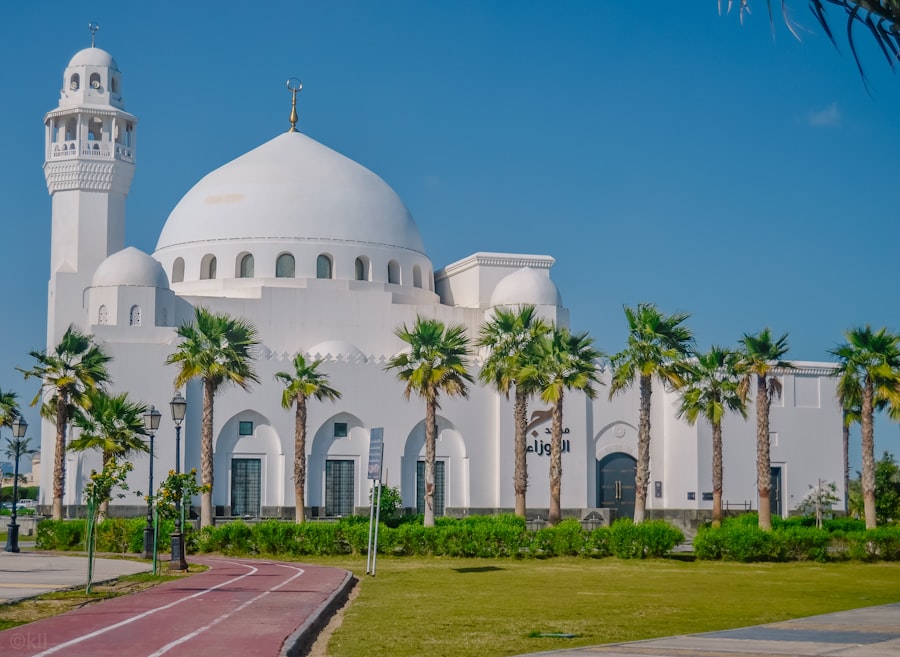
Al-Balad district, Jeddah. The historic commercial architecture of the old city remains one of the region’s most under-documented hospitality assets.
The line of italic text immediately after the image renders as a caption. This is a convention, not a component — it works because em in the prose context is styled as caption text. To add a caption, write a new line of *italic text* directly below the image with no blank line between.
Usage:

*Caption text in italics directly below the image.*Tables
Tables render with monospace uppercase column headers and thin row dividers. Use them for structured comparisons, data summaries, or reference information.
| Market | 2024 International Arrivals | 2025 Target | Status |
|---|---|---|---|
| UAE | 22.4M | 25M | On track |
| Saudi Arabia | 17.1M | 30M (Vision 2030) | Ahead of schedule |
| Qatar | 4.1M | 6M | Moderate shortfall |
| Bahrain | 10.8M | 14M | On track |
| Oman | 3.8M | 5M | On track |
Sources: National tourism authority annual reports, 2025. International arrivals figures are estimates pending final reconciliation.
Usage: Standard Markdown pipe table syntax.
Code
Inline code
Use inline code for technical references — API endpoints, configuration keys, file paths, or field names. It renders in monospace with a muted background.
Usage: `your code here`
Code blocks
Use fenced code blocks for multi-line technical content: configuration files, data schemas, query structures. They render on a dark background with a teal top border.
# Example article frontmatter
title: "Your Article Title"
subtitle: "An optional subtitle — one sentence, editorial register"
date: 2026-06-01
category: hospitality        # tourism | hospitality | food-and-beverage | entertainment | culture
region: gulf                 # ksa | uae | qatar | bahrain | oman | kuwait | gulf
author: your-author-slug
excerpt: "150–200 characters. Appears on index pages and in OG metadata."
featured: false
heroImage: "/images/your-hero.jpg"   # omit if no hero image
readingTime: 8                       # estimated minutes, optional
Usage:
```yaml
your code here
```
Horizontal rule
A horizontal rule creates a clear visual section break — heavier than a heading transition, lighter than a new article. Use it to mark a shift in voice (e.g., from analysis to field note), a time jump, or the transition from argument to conclusion.
Usage: ---
The rule renders as a thin line spanning the full content column with generous whitespace above and below. Do not use it as a substitute for heading structure.
Strong and emphasis
Bold (**text**) signals importance. Use it for key terms on first use, for the most critical claim in a paragraph, or for a named position in a quote attribution.
Italic (*text*) signals a register shift. Use it for titles of publications, films, or places; for foreign-language terms; for a phrase that is being used with deliberate irony or distance.
Avoid using both together — ***bold italic*** — except in truly exceptional circumstances.
What is not yet available
The following patterns are defined in the design system but do not yet have custom MDX components. They will be added as components once the component library is built:
- Field note blocks — raw-source material styled on a dark background with monospace type
- Editorial callouts — key insight blocks with a heavy left accent border
- Numbered editorial lists — large-numeral formatted lists with accent numbers
- Data tables with status indicators — colour-coded status cells
- Pull quote component — a more visually dominant pull quote than the standard blockquote
Until those components exist, use the standard Markdown equivalents shown above. The prose styling ensures plain MDX already reads well as a New Gulf Playbook article.